
Accounts & banking
Add a manual financial account
On this page
Use a manual account when you want to enter or import activity yourself. This can suit petty cash or a financial account you do not connect through a bank feed.
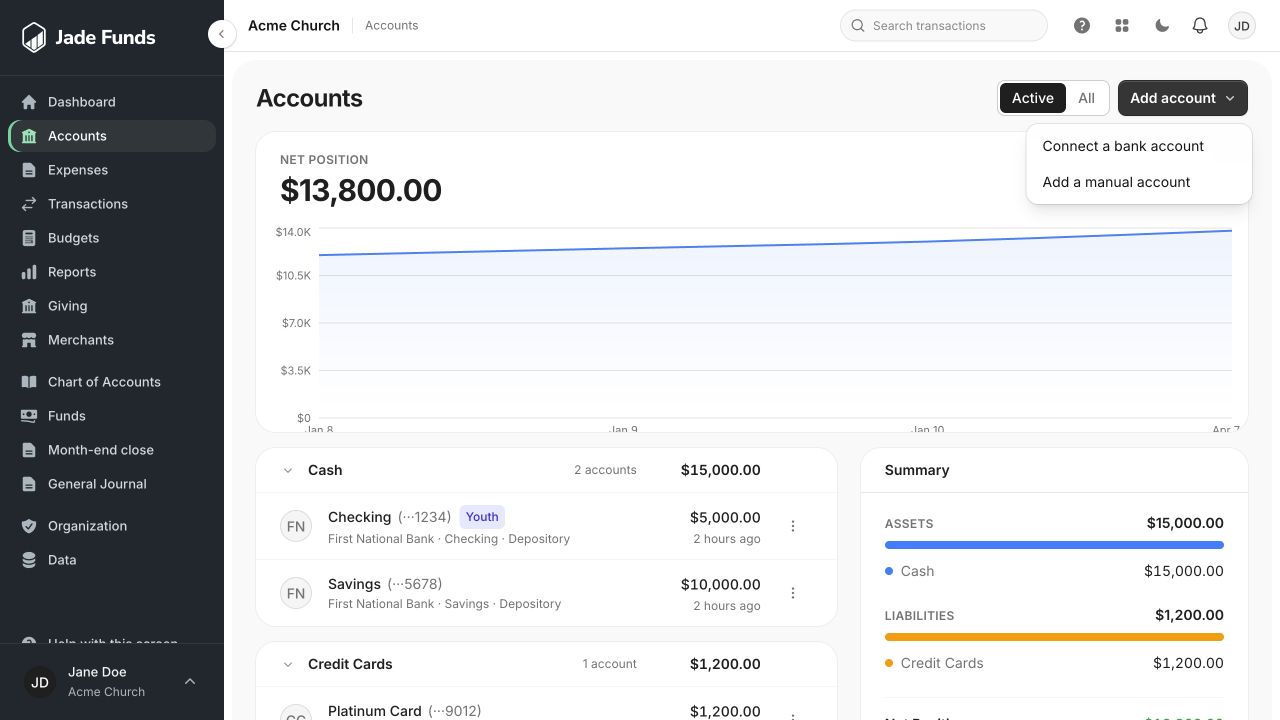
1. Connect a bank account starts the bank connection flow when available.
2. Add a manual account tracks an account without a bank feed.
3. Open an account to inspect its history and details.
Before you begin
You need permission to create financial accounts. Have the account name, type, currency, and any starting balance ready. Check the starting date with the person responsible for your books.
Create the account
- Open Accounts and choose Add account, then the manual-account option.
- Enter a recognizable name, such as Operating Checking or Petty Cash.
- Choose the account type and subtype. Enter optional identifying details, such as the last four digits.
- Enter a Starting balance if the account already has a balance. Select its Balance as of date and Default fund.
- Save the account, then open its detail page to add or import transactions.
Starting balances
Enter a nonnegative amount. For a credit card or loan, a positive starting balance represents the amount owed. A starting balance is recorded as an opening entry; it is not a new donation or ordinary income. Leaving it blank starts the account at zero.
Avoid duplicate activity
Coordinate the starting balance and imported history. Do not recreate money already included in the starting balance. See Import bank transactions from a CSV.
Was this article helpful?
Still need a hand?
Tell us what you were trying to do and what happened. Leave passwords and bank login details out of your message.
Contact Jade Funds support