
Accounts & banking
Connect a bank account
On this page
Bank connections provide a source of account activity through Plaid. Manual accounts and CSV imports remain available if you do not want a connection or your institution is not supported.
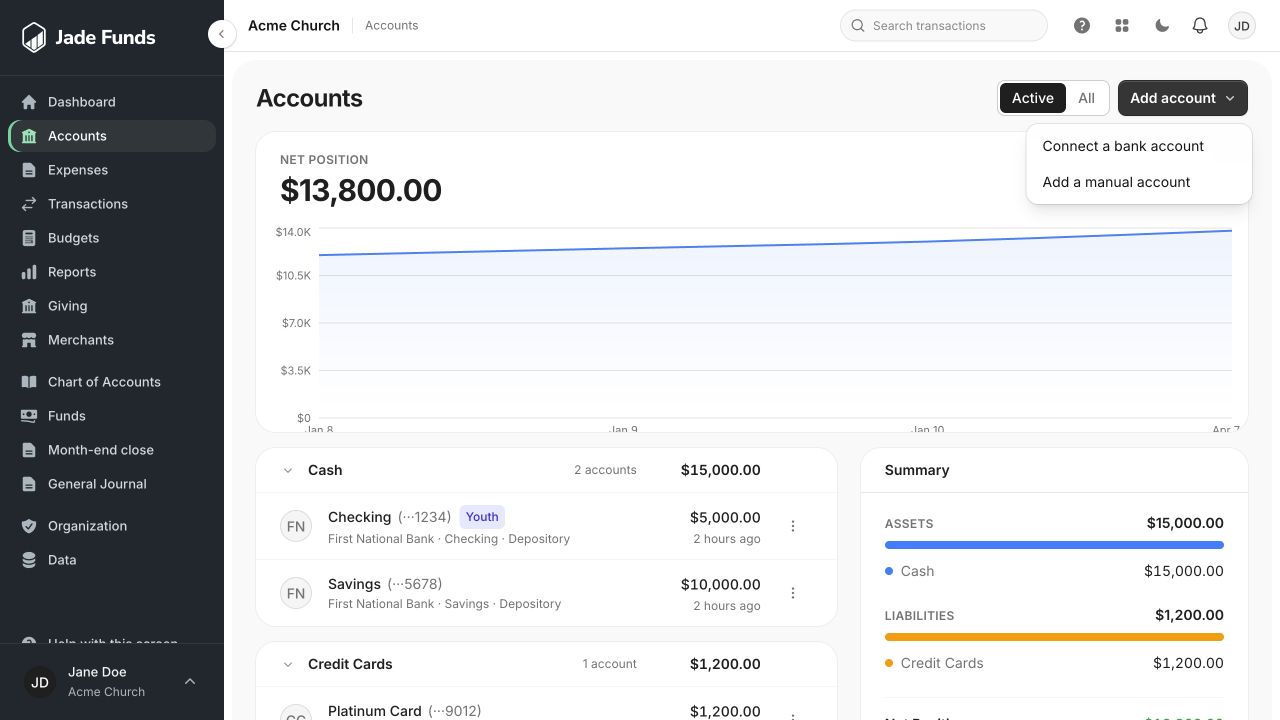
1. Connect a bank account starts the bank connection flow when available.
2. Add a manual account tracks an account without a bank feed.
3. Open an account to inspect its history and details.
Before you begin
Bank connection management is in Administration. Use a church-authorized bank login and complete the security verification requested by the app. An administrator may need to complete the connection.
Connect an institution
- Open Administration → Bank Connections, or the bank-connection option under Accounts.
- Start the connect flow and select your financial institution.
- Follow the institution’s sign-in and verification steps inside the Plaid flow.
- Choose the accounts you intend to bring into Jade Funds and finish the connection.
- Return to Accounts and check the imported account details and activity.
What happens next
Bank activity must still be categorized, assigned to the correct fund, and reviewed. A feed is a source of transactions, not a completed bookkeeping process. Pending activity may settle later.
If the connect option is unavailable
Bank feeds may be disabled for the environment you are using, or your access may require additional verification. Ask your administrator or use a manual account with CSV imports.
Keep credentials in the connection flow
Do not send your bank username, password, or verification codes to support. Describe the institution and the message you see instead.
Was this article helpful?
Still need a hand?
Tell us what you were trying to do and what happened. Leave passwords and bank login details out of your message.
Contact Jade Funds support