
Budgets & reports
Compare a budget with actual activity
On this page
A budget comparison helps your treasurer and finance committee see how recorded activity relates to the plan. Check both the selected plan and date range before interpreting a difference.
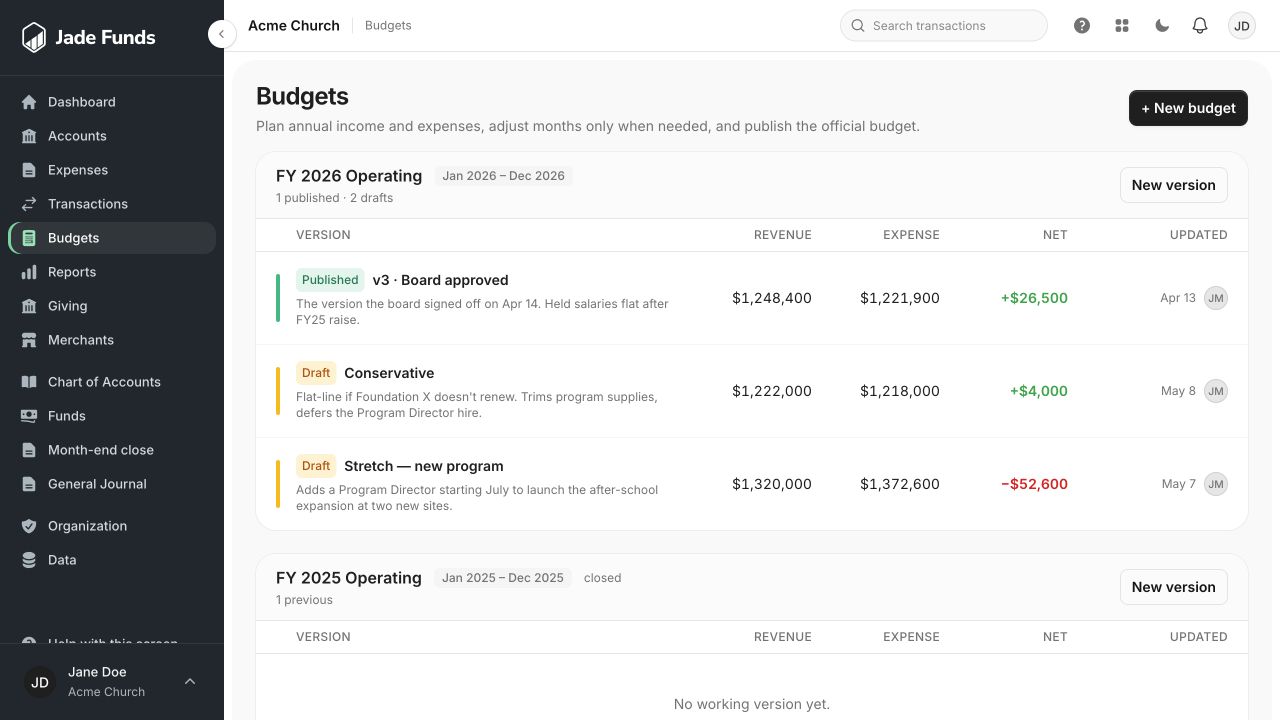
1. New budget starts a plan for a fiscal period.
2. Published identifies the official version used for comparisons.
3. New version creates another working version of an existing budget.
Read the published budget view
The published budget shows the annual plan, actual activity to date within its fiscal year, and the remaining amount. Actuals come from reviewed postings. A category with recorded activity may appear even if it was not included in the plan.
Run Budget vs. Actual
- Open Reports and choose Budget vs. Actual.
- Select the intended published budget rather than assuming every budget is combined.
- Choose the reporting months within the budget’s fiscal year.
- Review the planned amounts, actual amounts, and variances for the same period.
- Investigate large differences by checking the underlying reviewed activity and category choices.
Remaining and variance are different
Annual budget remaining is the annual plan minus actual activity to date. A period variance compares actual activity with the plan for the selected months. Neither figure is automatically cash available to spend.
If actuals are missing
Check transaction review, dates, categories, and your report access. A lack of permission to see actuals should not be interpreted as zero spending.
Planning by fund
Do not assume the budget assigns money across funds. Fund balances are a separate view of the books. See Read fund balances.
Was this article helpful?
Still need a hand?
Tell us what you were trying to do and what happened. Leave passwords and bank login details out of your message.
Contact Jade Funds support