
Budgets & reports
Create and publish a budget
On this page
A budget is your church’s plan for a fiscal year. It uses the income and expense categories in your chart of accounts, keeping the plan connected to recorded activity.
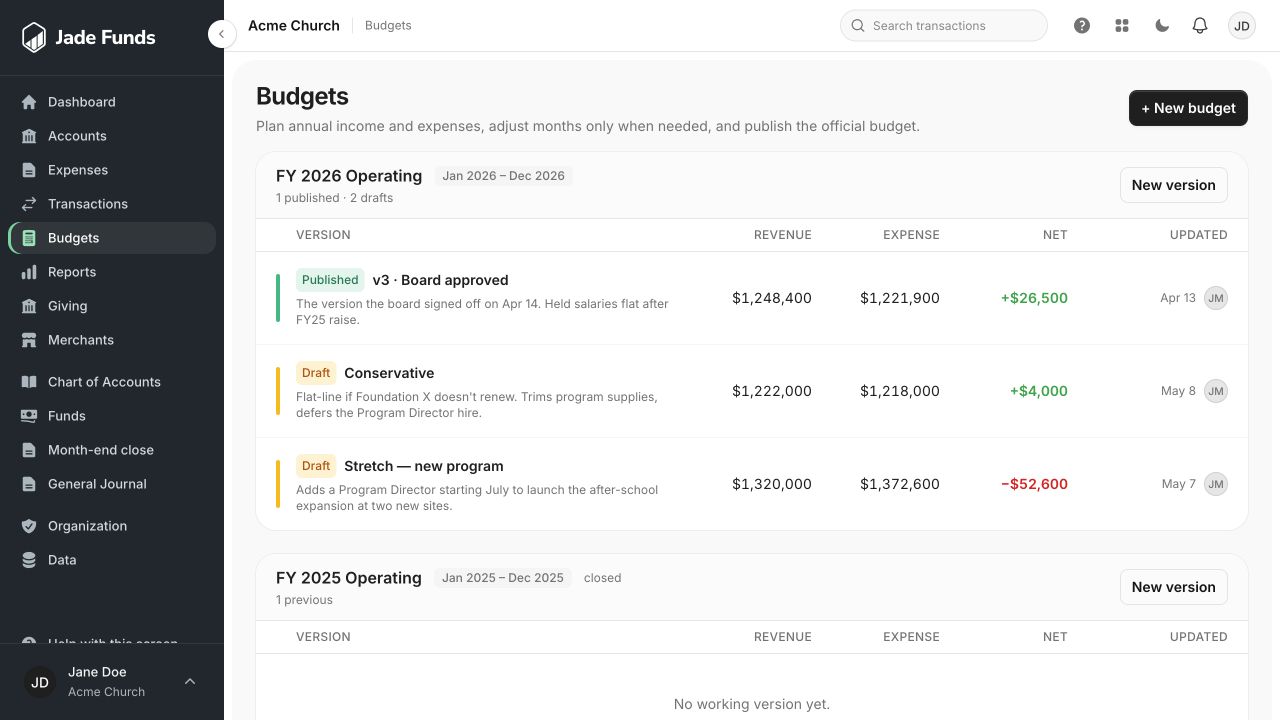
1. New budget starts a plan for a fiscal period.
2. Published identifies the official version used for comparisons.
3. New version creates another working version of an existing budget.
Before you begin
Check your chart of accounts and fiscal-year dates. You need permission to create or contribute to the budget; publishing requires its own authority.
Build the plan
- Open Budgets and create a budget.
- Enter a recognizable name and the fiscal-year dates.
- Choose a blank start or an available prior budget/version. Check the selected source before copying.
- Add the income and expense categories you intend to plan for, and enter their annual amounts.
- Review planned income, planned expenses, and the expected surplus or shortfall.
- Use More options when you need monthly adjustments or detailed tools.
- Wait for all changes to save, then choose Publish Budget when the plan is ready.
Seasonal activity
Annual amounts are spread across months by default. Adjust monthly amounts when an event, campaign, or expense occurs unevenly through the year.
A spending target is a goal
An optional total spending target helps compare planned expenses with the target. It does not move money or create a fund allocation.
After publishing
The published plan is protected. Use a revision for later changes, then check Budget vs. Actual with the intended published version.
Was this article helpful?
Still need a hand?
Tell us what you were trying to do and what happened. Leave passwords and bank login details out of your message.
Contact Jade Funds support