
Getting started
Find your way around the app
On this page
Choose the area that matches the task you are working on. What you can see and change depends on your church’s permissions and resource access.
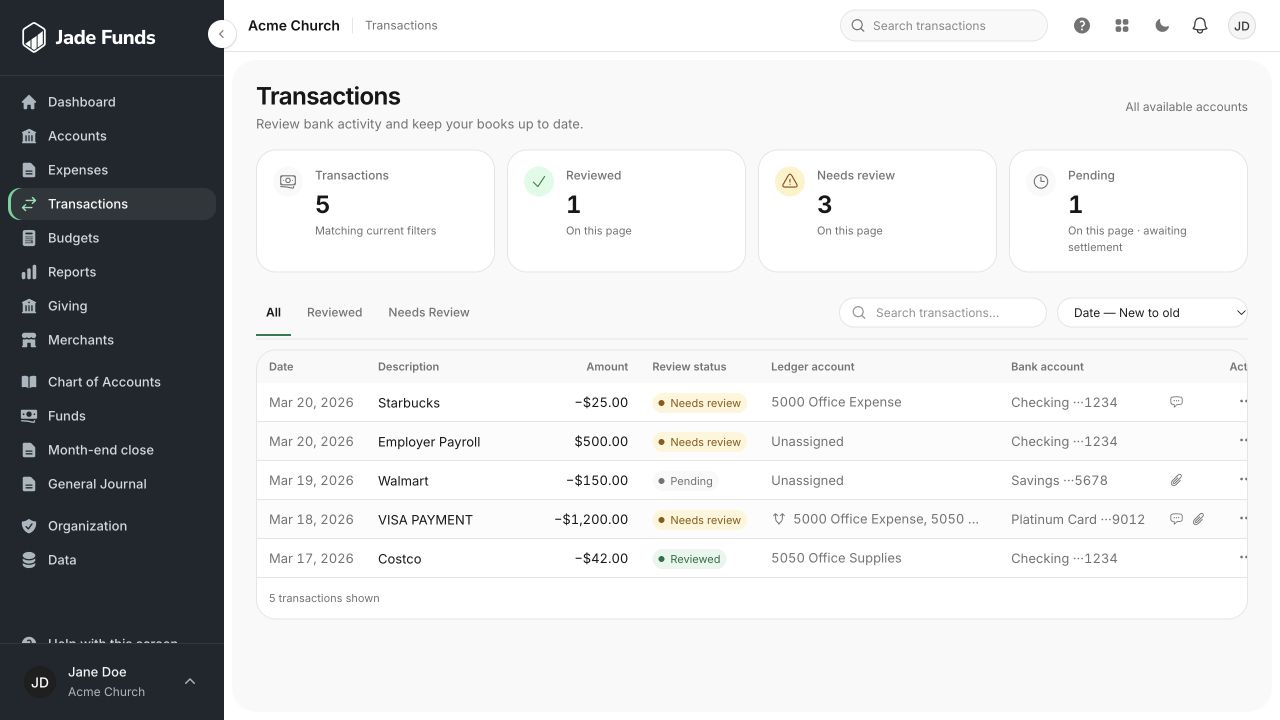
1. Search the transaction list by a word from the purchase.
2. Use Needs Review to narrow the list.
3. Open a transaction using the action at the end of its row.
Everyday financial work
- Accounts: open a financial account and work with its transaction history.
- Transactions: find activity across the accounts you can access, and open individual entries for details.
- Bookkeeping: work with the chart of accounts, funds, general journal, and month-end close.
- Budgets: create and revise your financial plan.
- Reports: read financial activity, balances, and budget comparisons.
People and settings
Administration contains organization settings, user management, bank connections, and data import/export tools. Your own profile, appearance, security, notifications, and sessions are under Settings.
If a page or action is missing
Ask your church administrator to check your role and access. Being able to read an account or budget does not always mean you can edit it. See Understanding roles and access.
Working on a smaller screen
Use the navigation menu to move between areas. Transaction details can be opened from either the Transactions list or an individual account’s history.
Was this article helpful?
Still need a hand?
Tell us what you were trying to do and what happened. Leave passwords and bank login details out of your message.
Contact Jade Funds support