
Getting started
Getting started with Jade Funds
On this page
Start with the records your church already uses: a chart of accounts, a list of funds, and recent statements for your financial accounts. You can work with manual accounts and imported transactions; a bank connection is not required.
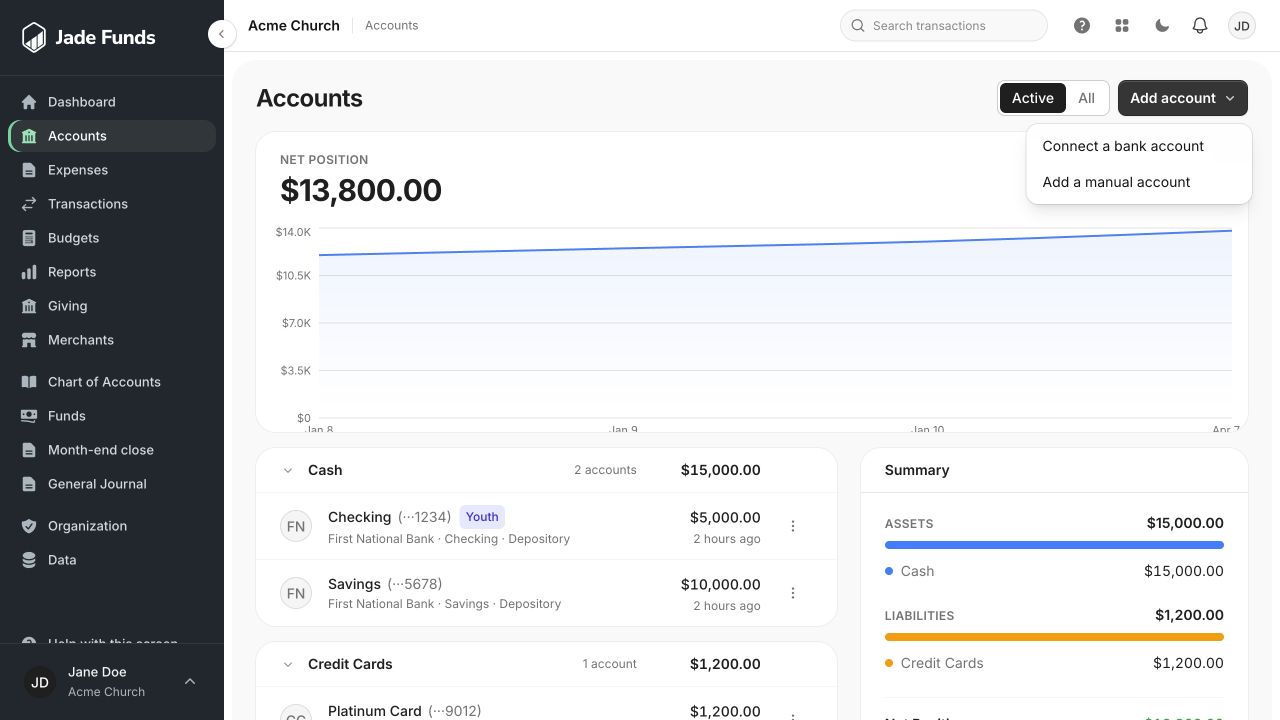
1. Connect a bank account starts the bank connection flow when available.
2. Add a manual account tracks an account without a bank feed.
3. Open an account to inspect its history and details.
Before you begin
Choose who will set up the organization. An administrator manages church settings and invitations. Other actions depend on the permissions assigned to each team member.
Set up in this order
- Check your organization name and fiscal-year settings in Administration.
- Set up your chart of accounts: the categories used to record income, expenses, assets, liabilities, and net assets.
- Review your funds. Keep money with a specific purpose distinguishable from general operating money.
- Add your financial accounts and establish the starting balances with the person responsible for your books.
- Import or enter transactions, choose categories and funds, and review the completed entries.
- Check reports, build a budget, and invite the colleagues who will help with the work.
Your first month
Work through transaction review before month-end reconciliation. Reports use reviewed postings, so importing a statement by itself does not finish the books. See the month-end close guide for the sequence.
If you are switching systems
Agree on your starting date and balances before importing history. Avoid counting the same activity in both a starting balance and an imported transaction. Bring questions about your existing setup to Jade Funds support.
Was this article helpful?
Still need a hand?
Tell us what you were trying to do and what happened. Leave passwords and bank login details out of your message.
Contact Jade Funds support