
Funds & bookkeeping
Set up your chart of accounts
On this page
The chart of accounts is the organized list of categories used in your books. It is separate from the list of financial accounts that hold your bank and cash activity.
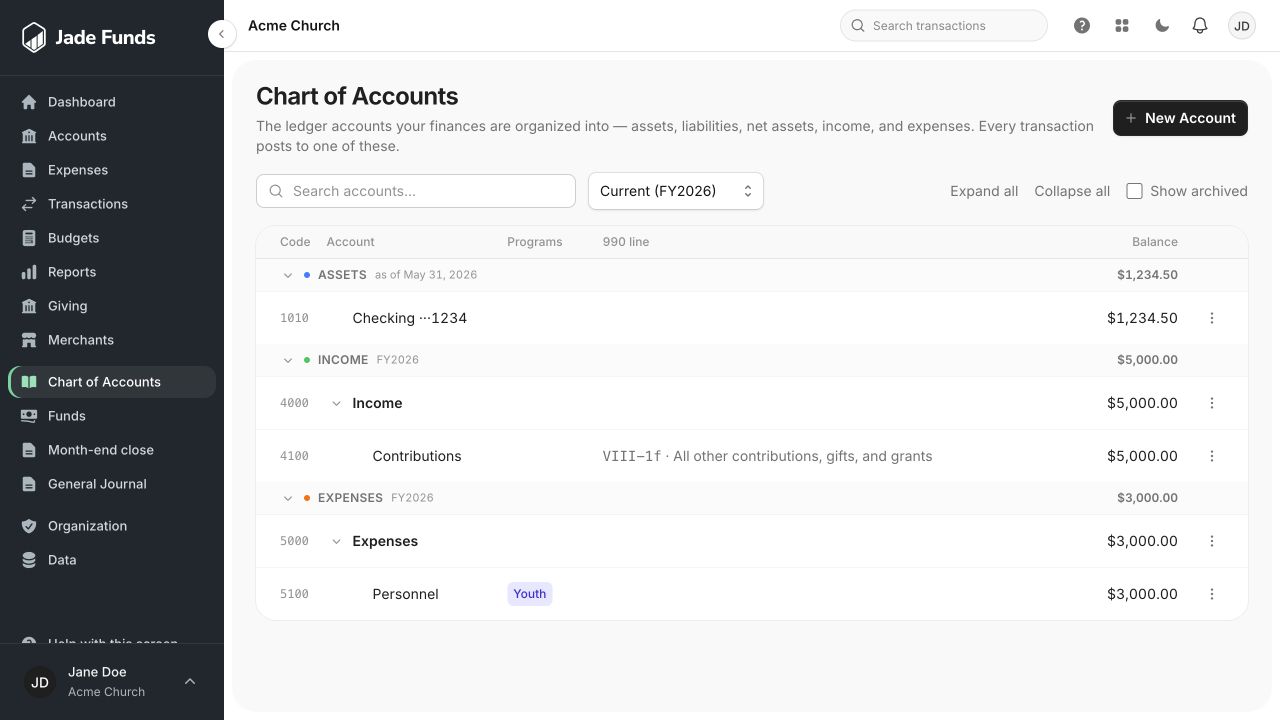
1. New Account adds a ledger category, rather than a bank connection.
2. Codes and account names organize the ledger categories.
3. Search accounts finds an existing category before you add another.
Choose a starting point
Open Bookkeeping → Chart of Accounts. Use the setup options to start with a template, import an existing chart, or create ledger accounts. Choose a structure your treasurer can maintain and your pastor or finance committee can understand.
Review the structure
- Check the income and expense categories against your church’s actual work.
- Review the asset, liability, and net-asset sections with the person responsible for the books.
- Use parent categories to group related accounts, and child categories where useful.
- Check imported names, types, and hierarchy in the preview before confirming.
- Save the chart and use these categories when recording transactions and budgets.
If you import a file
Correct unrecognized account types in the preview before confirming. A matching existing account may be skipped rather than updated. Do not assume re-importing a chart will rename existing categories.
Keep history understandable
Use archive controls where appropriate for categories you no longer need. Existing historical postings still matter to reports. System-managed bank ledger accounts have additional protections.
Next step
Set up funds and financial accounts before reviewing activity.
Was this article helpful?
Still need a hand?
Tell us what you were trying to do and what happened. Leave passwords and bank login details out of your message.
Contact Jade Funds support