
Transactions & receipts
Find a transaction
On this page
Use Transactions to find activity across the financial accounts you can access. If you already know the account, you can start from that account’s history instead.
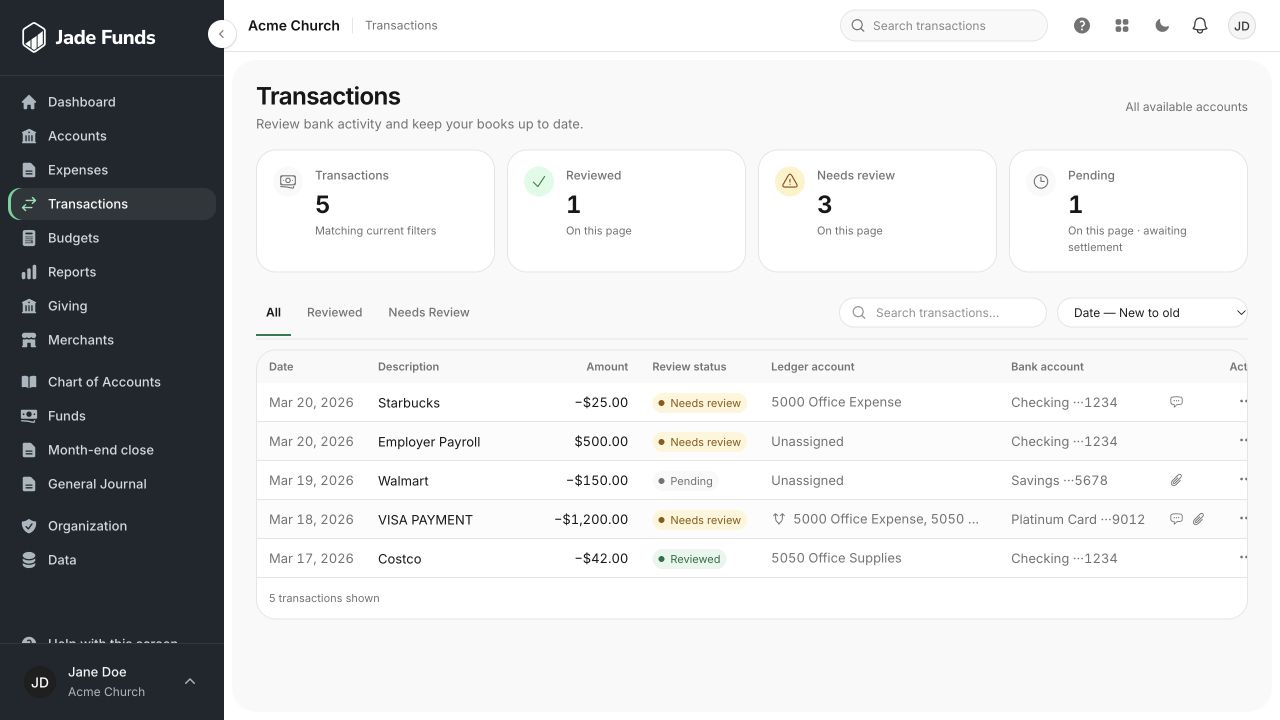
1. Search the transaction list by a word from the purchase.
2. Use Needs Review to narrow the list.
3. Open a transaction using the action at the end of its row.
Search and filter
- Open Transactions.
- Search for a description, merchant, or part of the original imported description.
- Check the review-status filter. Switch between imported/unreviewed and reviewed activity as needed.
- Adjust the sort order to find a date or amount.
- Open the transaction row or its details button to see categories, funds, receipts, and comments.
Try recognizable words
For a retreat purchase, try the store’s name or a word in the description. If a teammate replaced a vague bank description with “Fall retreat supplies,” that explanation can help you find it later.
If you cannot find it
- Clear the search and review filter.
- Check the correct organization and financial account.
- Look for pending bank activity that has not settled.
- Ask whether another teammate imported the statement or entered the transaction manually.
- Check with an administrator whether your access excludes the account or transaction.
Next step
Once you find the entry, check its category and fund or add the supporting receipt.
Was this article helpful?
Still need a hand?
Tell us what you were trying to do and what happened. Leave passwords and bank login details out of your message.
Contact Jade Funds support