
Transactions & receipts
Split a transaction across categories or funds
On this page
Split a transaction when one bank amount covers more than one category or fund. Keep the parts on the original transaction rather than creating separate copies of the bank activity.
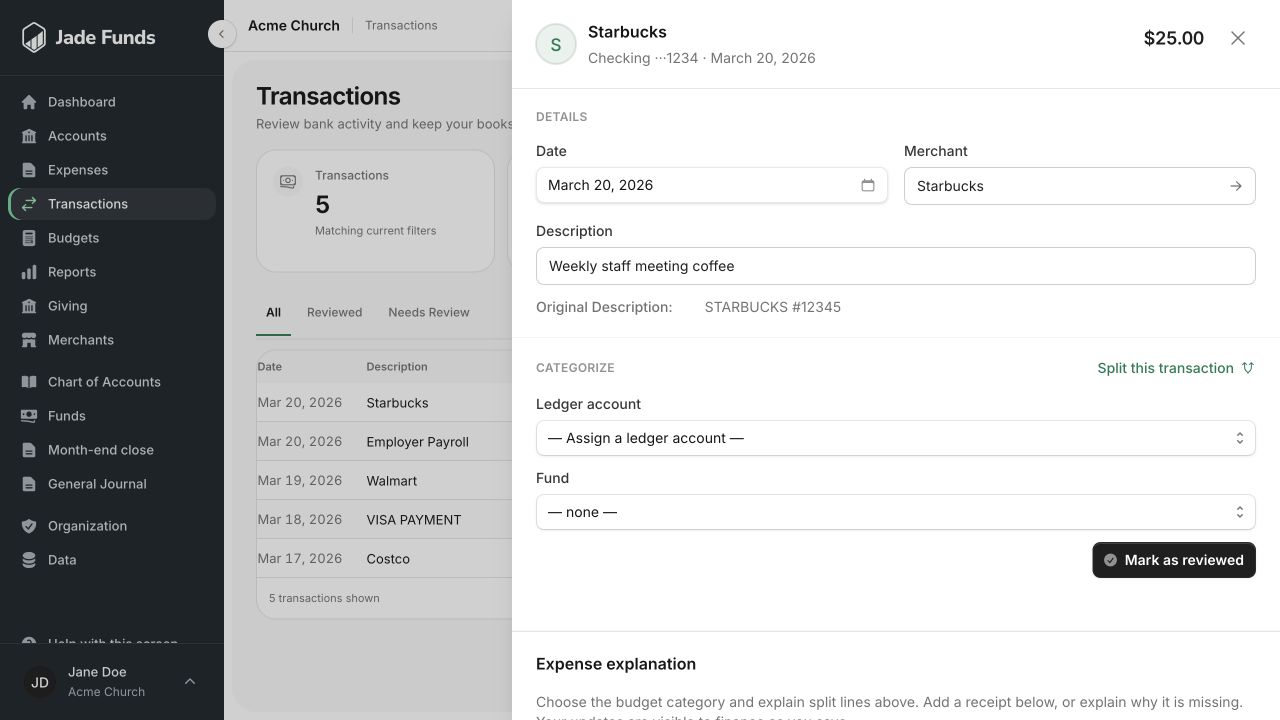
1. Choose the ledger category for the transaction.
2. Choose the fund that the activity belongs to.
3. Split this transaction when one purchase belongs to several categories or funds.
An example
An illustrative $150 store purchase might contain $100 of youth-event supplies and $50 of office supplies. Each line has its own category and fund, while both belong to the same purchase and receipt.
Allocate the lines
- Open the unreviewed transaction.
- Add or edit the category lines for the distinct parts of the purchase.
- Enter each line’s amount and choose its category and fund.
- Add a short line description if it helps explain the allocation.
- Check the total and the remaining unallocated amount.
- Review the completed entry only when the allocation is correct and the unallocated amount is zero.
Check the full amount
The line amounts must account for the original transaction exactly. For an expense, follow the amount convention shown by the editor; do not change the transaction’s bank amount to force an allocation to fit.
Splitting is not transferring money between funds
Assigning portions of a purchase to their proper funds differs from moving resources between funds. Use the appropriate journal workflow for an intentional fund transfer. See Journal entries and fund transfers.
Was this article helpful?
Still need a hand?
Tell us what you were trying to do and what happened. Leave passwords and bank login details out of your message.
Contact Jade Funds support