
Transactions & receipts
Add an explanation to a transaction
On this page
Use a comment to preserve context that would otherwise live in an email or text. For example: “Snacks for the youth retreat; receipt attached. Please charge to Youth Events.”
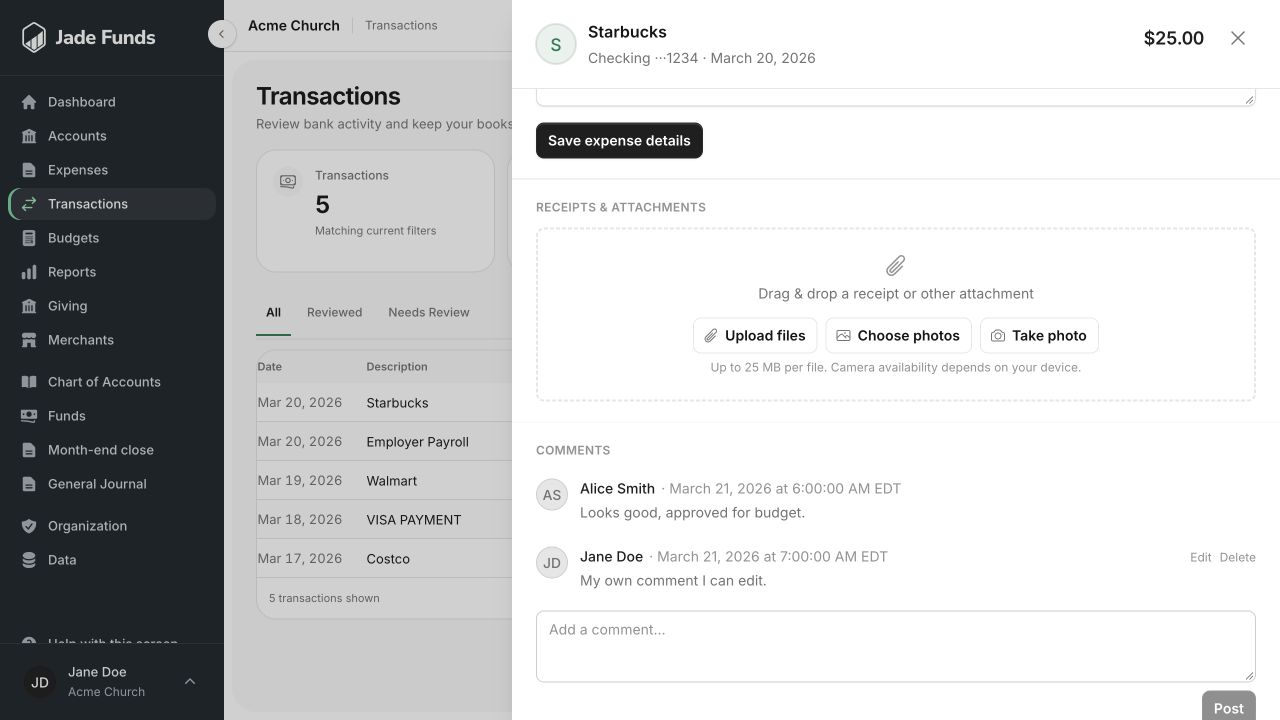
1. Upload files adds a receipt or supporting document.
2. Choose photos and Take photo offer device-dependent image options.
3. Use a comment to explain the ministry purpose or ask a question.
Add the explanation
- Open the transaction details.
- Find the comments area and enter the explanation or question.
- Include the event or ministry purpose and any detail the person reviewing it will need.
- Submit the comment and check that it appears in the thread.
Comments and accounting changes are different
A comment does not assign a category, change a fund, or complete review. The person responsible for the entry must still make those changes in the transaction’s financial fields.
If the books are already closed
Comments and attachments provide context without rewriting ledger amounts. Financial corrections to a reviewed transaction or closed month follow the separate reopen workflow. See Correct a reviewed transaction.
Write for the next person
Use enough detail that a new treasurer can understand the purchase months later. Keep passwords, bank verification codes, and unnecessary personal details out of the thread. See Attach a receipt for supporting documents.
Was this article helpful?
Still need a hand?
Tell us what you were trying to do and what happened. Leave passwords and bank login details out of your message.
Contact Jade Funds support